
49.HarmonyOS NEXT 登录模块开发教程(三)下:短信验证码登录进阶功能
2025-03-13 23:28:01
700次阅读
1个评论
温馨提示:本篇博客的详细代码已发布到 git : https://gitcode.com/nutpi/HarmonyosNext 可以下载运行哦!

HarmonyOS NEXT 登录模块开发教程(三)下:短信验证码登录进阶功能
效果预览
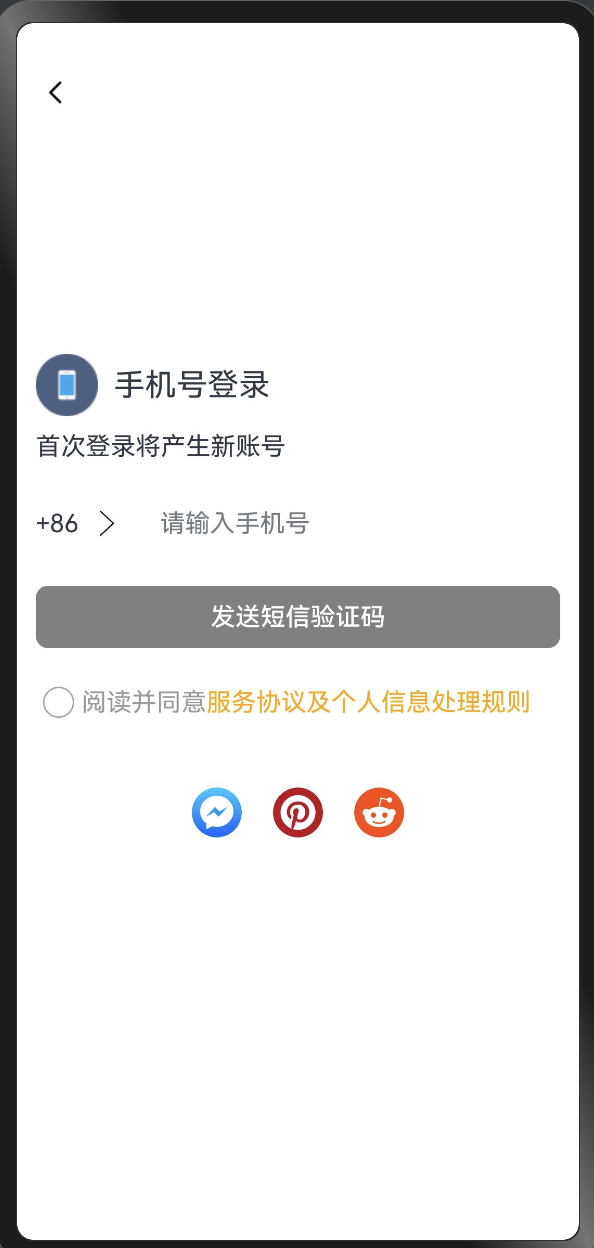
1. 引言
在上一篇教程中,我们实现了短信验证码登录的基础功能。本篇教程将深入介绍进阶功能的实现,包括倒计时、协议确认、第三方登录等功能。
2. 进阶状态变量
@Component
export struct OtherWaysToLogin {
    // 可发送验证码的倒计时秒数
    countdownSeconds: number = 0;
    // 是否勾选阅读并同意服务协议及个人信息处理规则
    isAgree: boolean = false;
    // 第三方登录图标
    loginIcons: Resource[] = [
        $r('app.media.app_logo1'),
        $r('app.media.app_logo2'),
        $r('app.media.app_logo3')
    ]
}
3. 倒计时功能实现
Button(this.buttonContent)
    .onClick(() => {
        if (this.countdownSeconds > 0) {
            return;
        }
        if (!this.phoneNumberAvailable) {
            promptAction.showToast({
                message: $r('app.string.modalwindow_message_right_phone_number')
            });
        } else if (!this.isAgree) {
            promptAction.showToast({
                message: $r('app.string.modalwindow_message_read_agreement')
            });
        } else {
            promptAction.showToast({
                message: $r('app.string.modalwindow_message_verify_code_send')
            });
            this.buttonColor = Color.Grey;
            this.countdownSeconds = COUNTDOWN_SECONDS;
            const timerId = setInterval(() => {
                this.countdownSeconds--;
                if (this.countdownSeconds <= 0) {
                    this.buttonContent = $r('app.string.modalwindow_verify');
                    clearInterval(timerId);
                    this.buttonColor = this.phoneNumberAvailable ? Color.Blue : Color.Grey;
                    return;
                }
                this.buttonContent = this.countdownSeconds + SEND_AGAIN_IN_SECONDS;
            }, 1000)
        }
    })
4. 协议确认功能
4.1 协议确认组件
@Component
export struct ReadAgreement {
    build() {
        Text() {
            Span($r('app.string.modalwindow_read_and_agree'))
                .fontColor($r('app.color.modalwindow_grey_9'))
            Span($r('app.string.modalwindow_server_proxy_rule_detail'))
                .fontColor(Color.Orange)
                .onClick(() => {
                    promptAction.showToast({
                        message: $r('app.string.modalwindow_server_proxy_rule_detail')
                    });
                })
        }
        .textAlign(TextAlign.Start)
    }
}
4.2 协议确认区域实现
Row() {
    Checkbox({ name: 'agreement' })
        .id('other_agreement')
        .select($$this.isAgree)
    ReadAgreement()
}
.width($r('app.string.modalwindow_size_full'))
.justifyContent(FlexAlign.Start)
5. 第三方登录功能
List({ space: SPACE_TWENTY }) {
    ForEach(this.loginIcons, (item: Resource) => {
        ListItem() {
            Image(item)
                .width($r('app.integer.modalwindow_other_ways_icon_height'))
                .borderRadius($r('app.integer.modalwindow_other_ways_border_radius'))
                .onClick(() => {
                    promptAction.showToast({
                        message: $r('app.string.modalwindow_message_third_party_authorization')
                    });
                })
        }
    })
}
.listDirection(Axis.Horizontal)
6. 性能优化
6.1 列表渲染优化
在处理列表渲染时,根据实际场景选择合适的方式:
- 数据量小且固定时使用ForEach
- 数据量大或动态加载时使用LazyForEach
6.2 状态管理优化
- 合理使用@State装饰器
- 避免不必要的状态更新
- 及时清理定时器等资源
7. 最佳实践
-
输入验证
- 使用inputFilter限制输入
- 实时验证输入合法性
-
状态管理
- 使用@State管理UI状态
- 合理设计状态变量
-
交互反馈
- 提供及时的视觉反馈
- 使用Toast提示用户
-
代码复用
- 抽取公共组件
- 提高代码可维护性
8. 参考资源
00
- 嗯
mobile-kCulimOnlwkgoeV8rs4
2025-04-16 09:38:13
这个倒计时是不是切换页面后会重置,如果是的话,那倒计时好像也没啥作用吧